
When you send all the supporting documents for a profile creation to iKhokha, it is vital that you attach ALL the supporting documents to this one email. If the images are too big, the email won’t go through. If you send the images in separate emails, then each email will be seen as a new ticket by the iKhokha on-boarding team, which will delay the application.
Reminder: which images do you need to send as attachments?
Step 1: Download this app from the Google Play store: Compress image size in kb & mb (the name of the app). It looks like this:

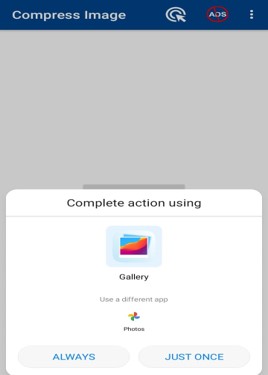
Step 2: Open the app and select the image you want to resize:

Step 3: Select ‘Gallery’ or ‘Camera’
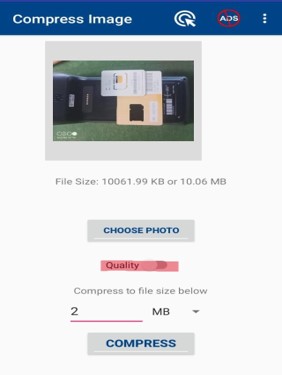
Step 4: Do not touch the ‘Quality’ button. Use the slider to reduce the photo size to 2 MB and select compress.
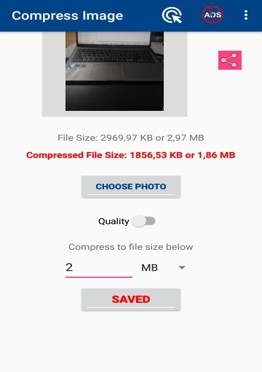
Step 5: The photo will now be automatically saved in your gallery, in a compressed folder.
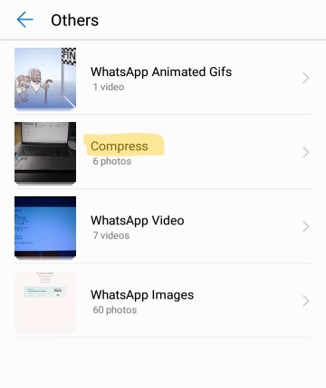
Step 6: You can find your compressed photos in a new folder under ‘Gallery’ or ‘Other’ as COMPRESS
Step 7: Create an email with the compressed images attached.

You need to double check that the compressed images sizes are as per the example. If they are bigger, then the email won’t send.
Click here to return to Documents you need to create a new client profile.
Click here to return to the iKhokha Training Centre.